Taking payment
Cash, card terminal and mobile money, split payments and giving change.
- For cashiers
On this page
What it's for
Payment records how the customer paid and saves the sale on the till, before the receipt prints. The till doesn't talk to the card terminal or the mobile money network: you take the payment there as usual, then record it here.
Before you start
Add everything to the sale. The Pay button shows the total.
Steps
- Tap Pay, beside the total under the receipt.
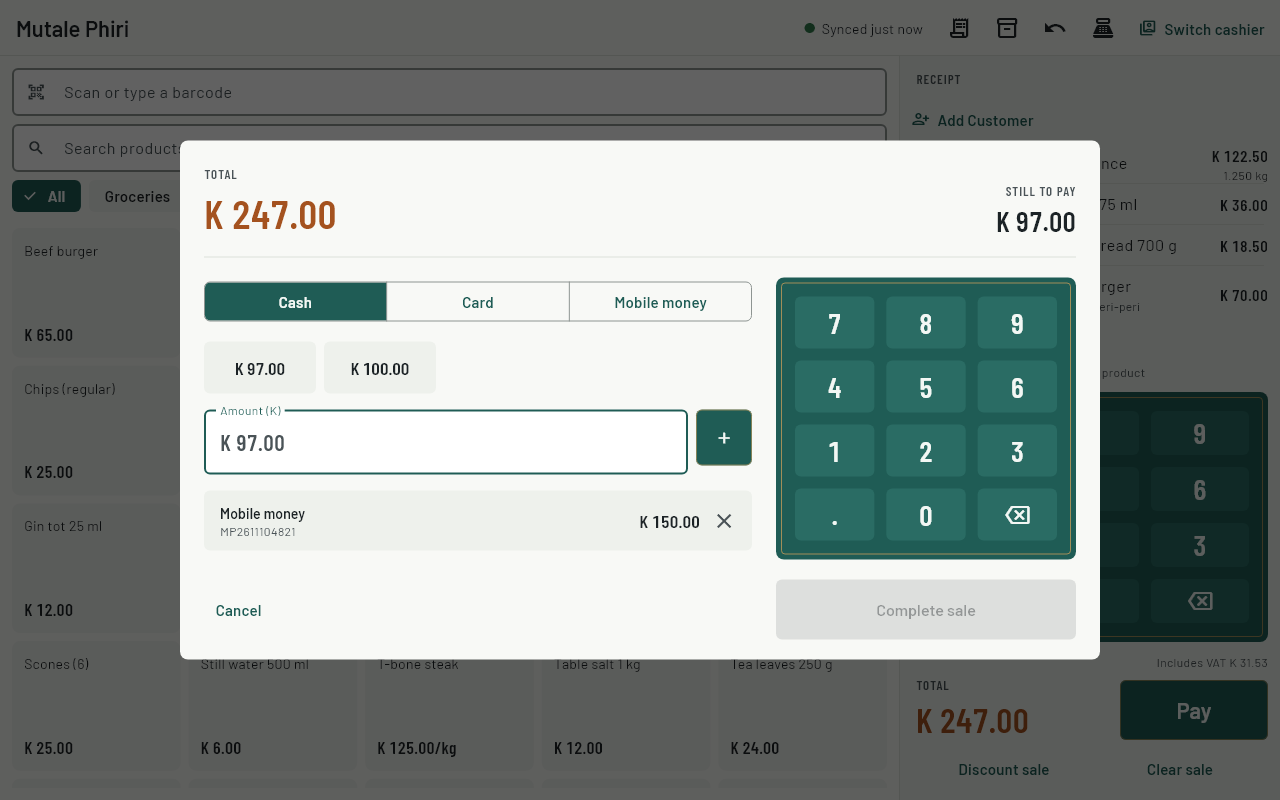
- Choose how the customer pays: Cash, Card or Mobile money.
- Cash: tap one of the amount buttons (the exact amount, or the next K 10, K 50 or K 100), or type the amount handed over on the keypad and tap +.
- Card or mobile money: take the payment on the terminal or phone first. Then type the amount (leave it empty for the full amount) and, if you like, the reference from the slip or SMS. Tap +.
- To split a payment, for example part mobile money and part cash, add each one. Still to pay shows what's left.
- Tap Complete sale. The till shows the change due in large numbers and prints the receipt.
- Give the change, then tap New sale.
Common questions
I added the wrong payment.
Tap ✕ next to it before completing the sale.
Why can't I put more than the total on card?
Only cash can give change. For card and mobile money, enter the exact amount taken.
It says "The sale wasn't saved".
Nothing was recorded and the sale is still on the screen. Check the payments and tap Complete sale again.
The receipt didn't print.
The sale is saved anyway. Reprint it from History.
Can I take payment without internet?
Yes. Every sale is saved on the till and sent to the server when the internet is back.