Stock alerts and the daily summary
Get an email when products run low, and yesterday's takings every morning.
- For owners
What it's for
Owners and managers get two kinds of email, so they know what's happening without opening the dashboard:
- Low-stock alerts arrive when a product reaches its low-stock alert level in one of your stores.
- The daily summary arrives just after midnight. It covers yesterday's sales, refunds and cash differences at shift close, plus anything waiting in Needs Review.
Managers only hear about the stores they're linked to. Owners hear about every store.
Before you start
- Give the products you care about a low-stock alert level. Do this in Products, by editing the product and setting Low stock alert at. Products without one never send an alert.
- The product must have Track stock turned on.
Steps
- Set a Low stock alert at on a product, for example 5 for a 2 kg bag of sugar.
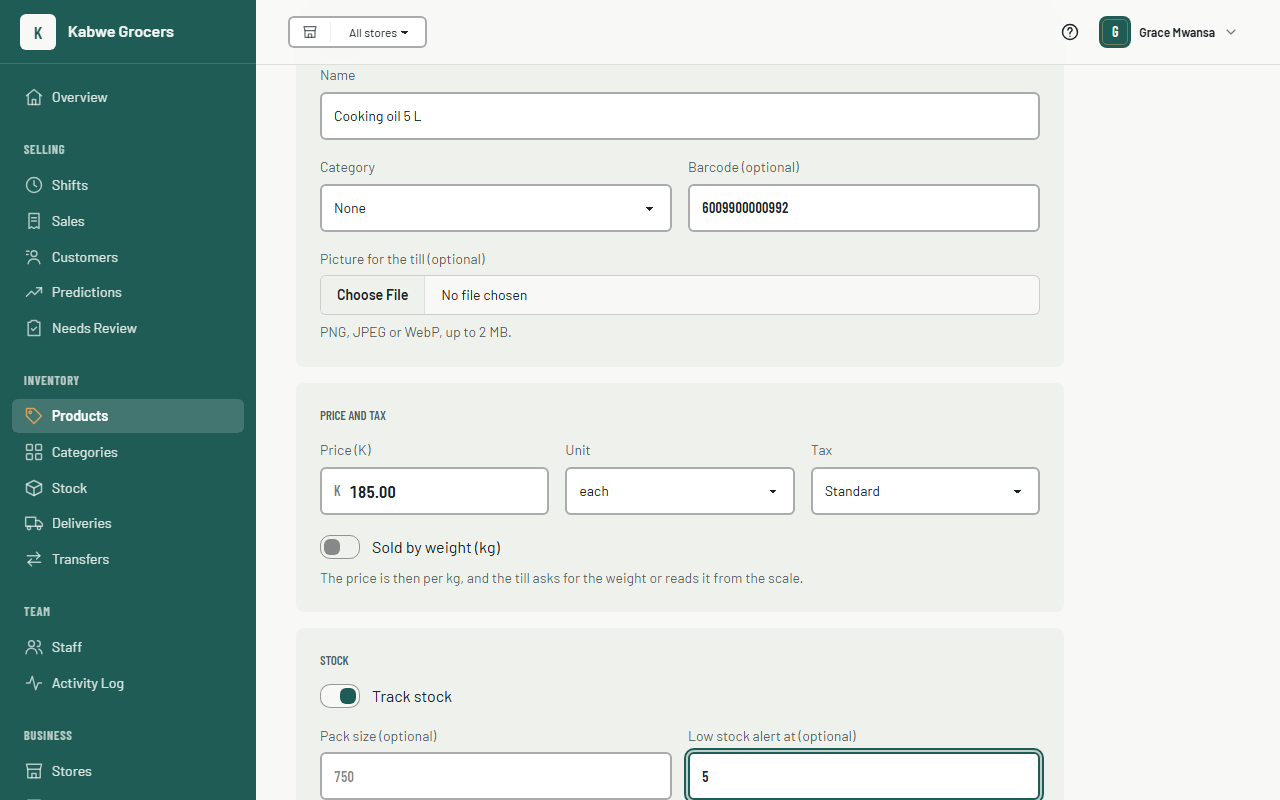
- When a sale brings that store's stock to 5 or below, you get an email within the hour. It lists each product, how many are left and its alert level.
- You won't get the same alert again while the product stays low. When it's restocked above the level and later drops again, you get a new alert.
- Each morning you get the daily summary for yesterday.
- The owner and manager app also shows low stock, plus anything expected to run out within 7 days at its recent rate of sale. See The admin app.
Turning the emails off
Open Your Account from the menu under your name. Under Notifications, turn off Email me stock alerts and a daily summary, then choose Save. This only changes your own emails. See Your account.
Common questions
I didn't get an alert for a product that's low.
Check that the product has a Low stock alert at level and Track stock turned on, and that you're linked to that store. If it was already low before you set the level, you get one alert at the next hourly check.
Why do I get one email for several products?
Alerts found in the same hourly check come together, grouped by store.
What is a cash difference?
At shift close, the cashier counts the drawer. The summary lists shifts where the count was above (+) or below (−) what the till expected. See Shifts.