Products, barcodes and categories
Add the things you sell, with prices, barcodes, categories and options.
- For owners
- For managers
On this page
What it's for
Your product list is what the tills sell. Changes reach every till the next time it syncs, usually within a minute.
Before you start
Owners and managers can edit products. Have your prices and, if you scan, the barcodes on your stock.
Steps
- In the dashboard, choose Products, then Add product.
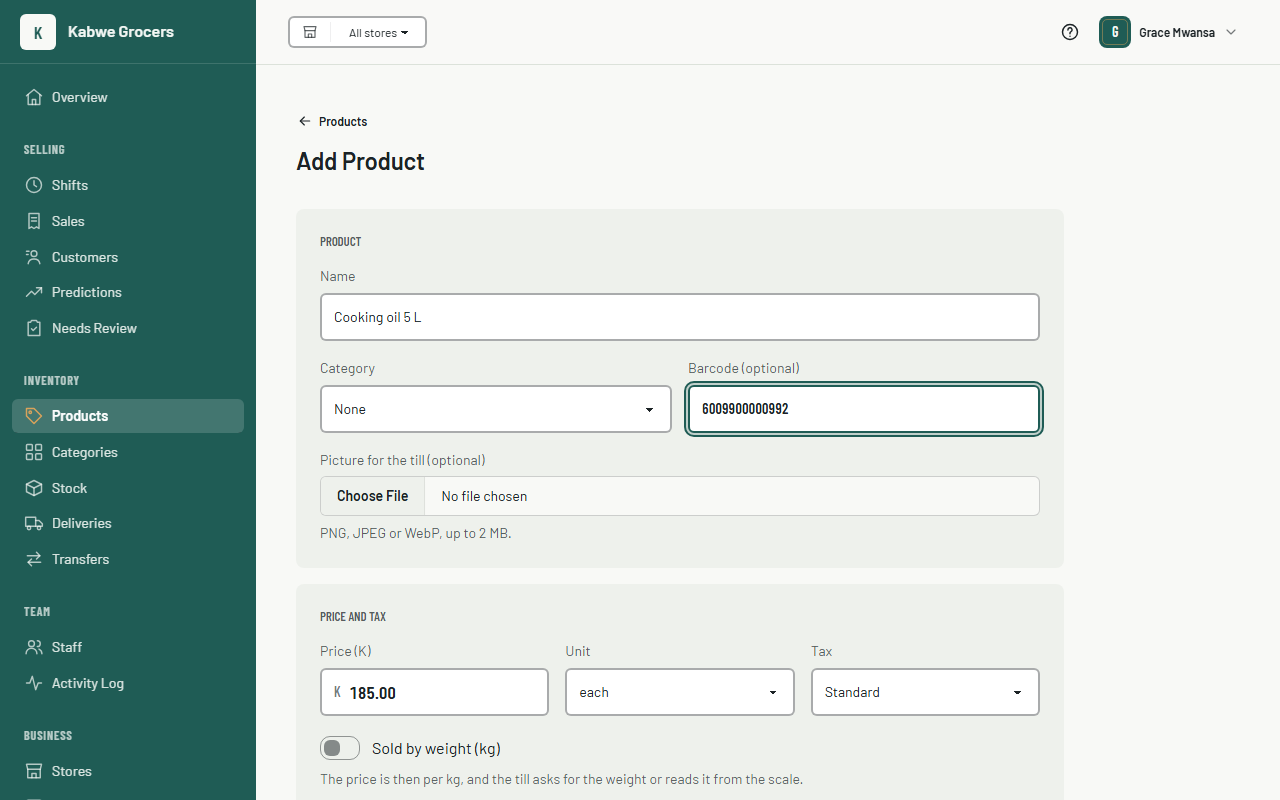
- Enter a name and the price in Kwacha, for example
12.50. - Optionally pick a category, scan or type the barcode, and choose the tax (standard, zero-rated or exempt).
- Leave Track stock on for things you count, and turn it off for things you don't, like services. Set Low stock alert at to the level you want to reorder at: the Overview lists products at or below it, and Predictions shows when each will run out.
- Optionally add an image (PNG, JPEG or WebP, up to 2 MB).
- Choose Save. You can now add options and components on the same page.
Categories
Categories are the tabs above the products on the till. In the dashboard, choose Categories (under Inventory). Type a name and choose Add to make one. To rename one, change its name and press the tick. Use the arrows to move a category up or down: the till shows them in this order. Deleting a category doesn't delete its products; they just become uncategorized.

Options
Options are choices the cashier picks at the till, such as Size (Small, Large +K5.00) or Extras (Cheese +K3.00).
- Under Options, enter a group name such as
Size. Tick Required if the cashier must choose, and Pick many if more than one can be chosen. - Add each option with its price change. Use a minus sign for a cheaper option, such as
-2.00.
Common questions
It says "This barcode is already used by …".
Each barcode can belong to one product only, including archived products. Edit the other product's barcode first.
How do I stop selling something?
Open it and choose Archive. It disappears from the tills but stays in your reports. Choose Unarchive to bring it back.