Receipts, printers and the cash drawer
Connect a thermal receipt printer, print a test page, choose the paper width and open the cash drawer.
- For owners
- For managers
What it's for
Each till prints its own receipts on an ESC/POS thermal printer, the common kind sold for shops and bars. The cash drawer plugs into the printer and opens when a sale is paid with cash.
Before you start
- Log in to the till with an owner or manager PIN. Cashiers can't change printer settings.
- Check the printer is switched on, has paper, and is connected one of these ways:
- Network: on the same Wi-Fi or router as the till. Print the printer's self-test (usually: hold the feed button while switching it on) to find its IP address. Ask whoever set up the router to give it a fixed address.
- USB on Windows: install the printer's Windows driver first, so it shows in Printers & scanners.
- USB on an Android tablet: plug it in with an OTG cable and allow access when the tablet asks.
- Bluetooth (Android tablets only): pair it in the tablet's Bluetooth settings first. The PIN is usually 0000 or 1234.
- Plug the cash drawer's cable (it looks like a phone cable) into the port on the back of the printer marked DK or Drawer.
Steps
- On the sell screen, tap the printer icon at the top.
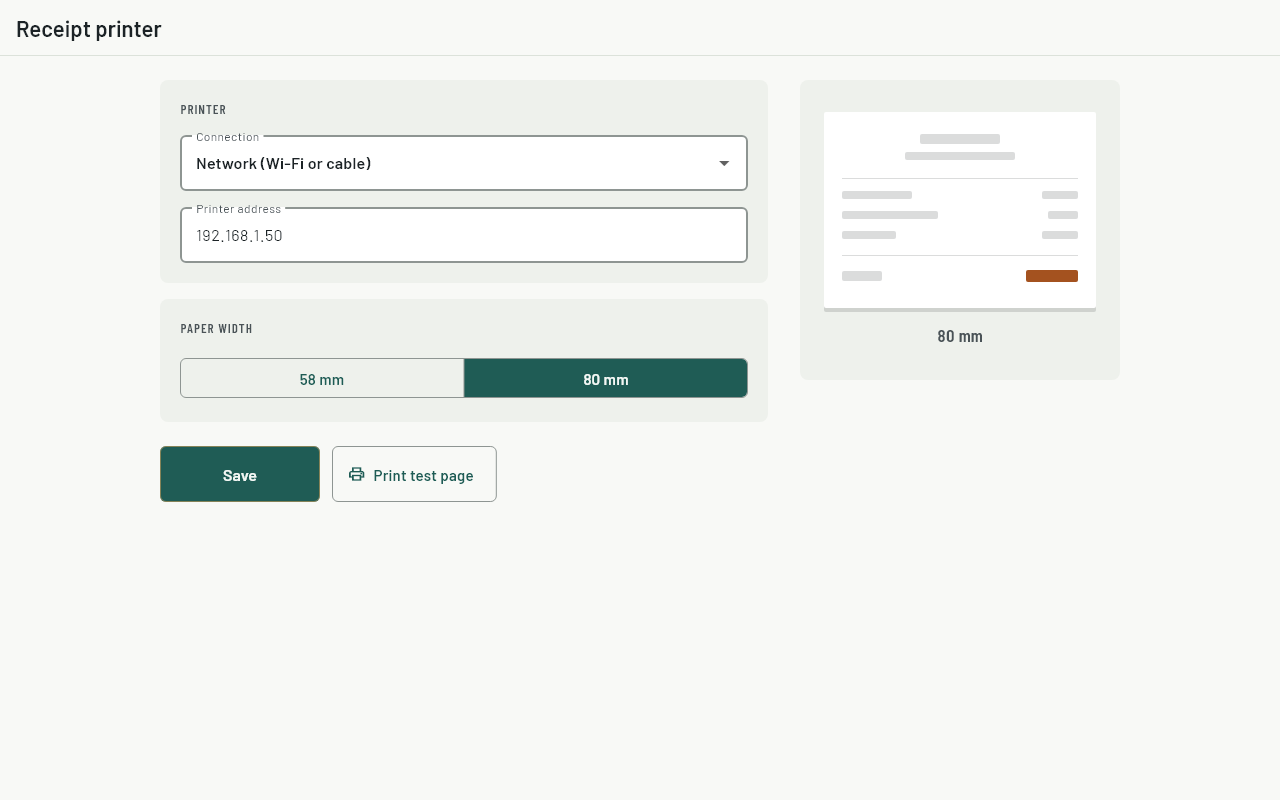
- Under Connection, choose Network, USB or Bluetooth.
- Network: type the printer's IP address, for example
192.168.1.50. USB or Bluetooth: tap Find printers and pick yours from the list. - Under Paper width, choose 58 mm or 80 mm. The width is printed on the paper roll's box; 80 mm is the wider, more common roll.
- Tap Print test page. The page prints and the cash drawer opens.
- Tap Save.
Reprinting a receipt
Open History, tap the sale, then tap Reprint. The reprint shows the same receipt number, items and payments as the original. A reprint never opens the drawer.
Common questions
The till says "Receipt not printed. Reprint from History."
The sale is saved and will sync as normal. Fix the printer (paper, power, cable or Wi-Fi), then reprint from History.
The test page prints but the drawer doesn't open.
Check the drawer cable is in the printer's DK port, not the network port, and that the drawer isn't locked with its key.
Text runs off the edge or the receipt looks narrow.
The paper width is wrong. Change Paper width and print the test page again.
The network printer worked yesterday and doesn't today.
Its IP address has probably changed. Print the printer's self-test to see the new one, or give it a fixed address on the router.
Can a till work without a printer?
Yes. Choose No printer. Sales are saved as usual and no receipt prints.
Do card and mobile money sales open the drawer?
No. Only a sale with a cash payment opens it.