Sales and refunds that need review
See the sales and refunds a till sent that broke a rule, look into them, and mark them checked.
- For owners
- For managers
On this page
What it's for
Tills keep selling when they're offline, so the server can't stop a sale or refund as it happens. Instead, when a till syncs, the server checks every sale and refund. Anything that broke a rule is kept, and listed on Needs Review, for example:
- a discount above the cashier limit without a manager's approval
- a refund without a manager's approval
- a refund for more than the customer paid
- totals that don't add up
Needs Review lists them, so you can look into each one and record what you found.
Before you start
You need:
- to be an owner or a manager (managers see the stores they're assigned to)
- tills that have synced
Steps
- In the dashboard, choose Needs Review (under Selling). The To check tab lists what nobody has checked yet, newest first.
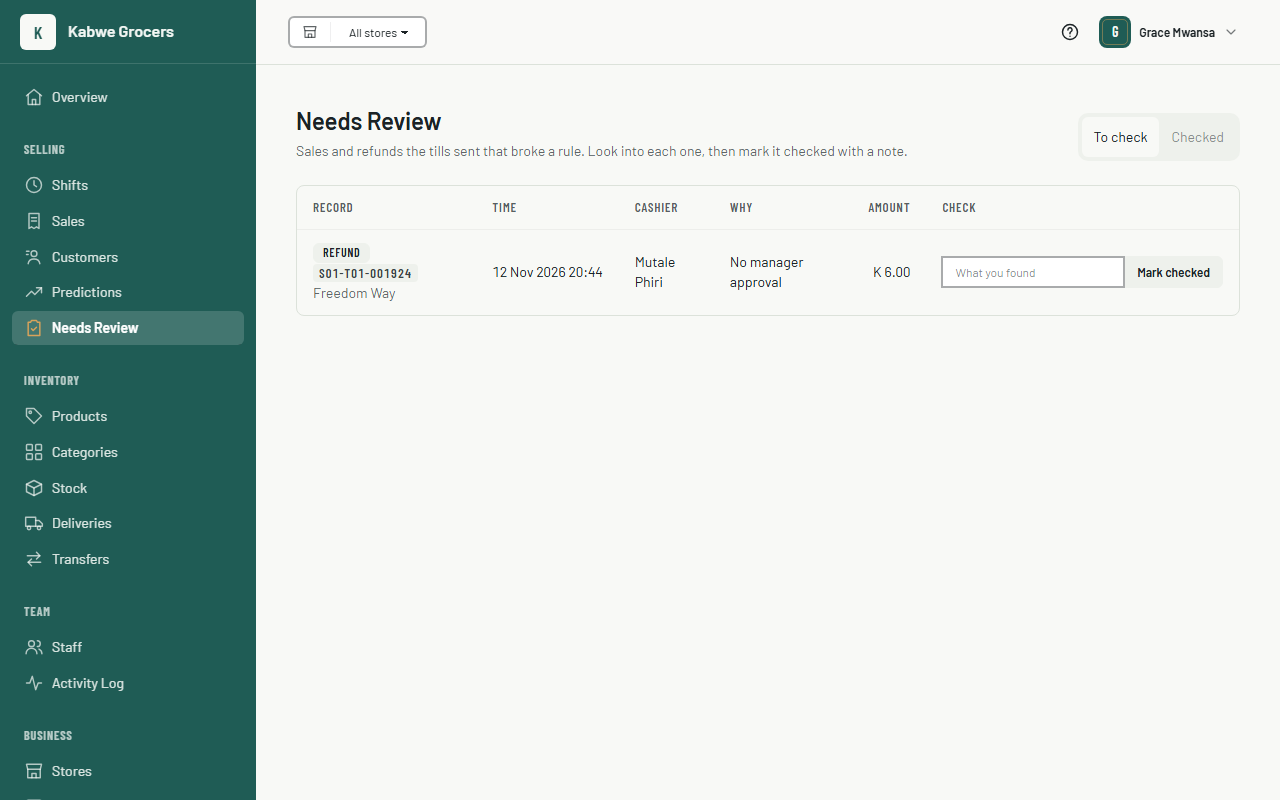
- Read Why for each one, and look into it: ask the cashier, check the receipt, count the drawer.
- Type what you found in the note, for example "Manager approved by phone", then choose Mark checked.
- Choose the Checked tab to see what's been checked, by whom, when, and their note.
Common questions
Does marking it checked change the sale or refund?
No. Sales and refunds a till made are never changed. The check is saved next to it, and the sales report and the CSV still show it was flagged.
Two managers marked the same refund. Which note is kept?
The first one. The second sees it already in Checked.
Can I undo a check?
Not yet. Every check is also in the Activity Log.
Where else do flagged records show?
Refunds show a Needs Review badge on Sales → Refunds, and the Every sale (CSV) download has a "needs review" column.